Technische Universität Braunschweig
  • Study & Teaching
    • Beginning your Studies
      • Prospective Students
      • Degree Programmes
      • Application
      • Fit4TU
      • Why Braunschweig?
    • During your Studies
      • Fresher's Hub
      • Term Dates
      • Courses
      • Practical Information
      • Beratungsnavi
      • Additional Qualifications
      • Financing and Costs
      • Special Circumstances
      • Health and Well-being
      • Campus life
    • At the End of your Studies
      • Discontinuation and Credentials Certification
      • After graduation
      • Alumni*ae
    • For Teaching Staff
      • Strategy, Offers and Information
      • Learning Management System Stud.IP
    • Contact
      • Study Service Centre
      • Academic Advice Service
      • Student Office
      • Career Service
  • Research
    • Research Profile
      • Core Research Areas
      • Clusters of Excellence at TU Braunschweig
      • Research Projects
      • Research Centres
      • Professors‘ Research Profiles
    • Early Career Researchers
      • Support in the early stages of an academic career
      • PhD-Students
      • Postdocs
      • Junior research group leaders
      • Junior Professorship and Tenure-Track
      • Habilitation
      • Service Offers for Scientists
    • Research Data & Transparency
      • Transparency in Research
      • Research Data
      • Open Access Strategy
      • Digital Research Announcement
    • Research Funding
      • Research Funding Network
      • Research funding
    • Contact
      • Research Services
      • Academy for Graduates
  • International
    • International Students
      • Why Braunschweig?
      • Degree seeking students
      • Exchange Studies
      • TU Braunschweig Summer School
      • Refugees
      • International Student Support
    • Going Abroad
      • Studying abroad
      • Internships abroad
      • Teaching and research abroad
      • Working abroad
    • International Researchers
      • Welcome Support
      • PhD Studies
      • Service for host institutes
    • Language and intercultural competence training
      • Learning German
      • Learning Foreign Languages
      • Intercultural Communication
    • International Profile
      • Internationalisation
      • International Cooperations
      • Strategic Partnerships
      • International networks
    • International House
      • About us
      • Contact & Office Hours
      • News and Events
      • International Days
      • 5th Student Conference: Internationalisation of Higher Education
      • Newsletter, Podcast & Videos
      • Job Advertisements
  • TU Braunschweig
    • Our Profile
      • Aims & Values
      • Regulations and Guidelines
      • Alliances & Partners
      • The University Development Initiative 2030
      • Foundation University
      • Facts & Figures
      • Our History
    • Career
      • Working at TU Braunschweig
      • Vacancies
    • Economy & Business
      • Entrepreneurship
      • Friends & Supporters
    • General Public
      • Check-in for Students
      • The Student House
      • Access to the University Library
    • Media Services
      • Communications and Press Service
      • Services for media
      • Film and photo permits
      • Advices for scientists
      • Topics and stories
    • Contact
      • General Contact
      • Getting here
  • Organisation
    • Presidency & Administration
      • Executive Board
      • Designated Offices
      • Administration
      • Committees
    • Faculties
      • Carl-Friedrich-Gauß-Fakultät
      • Faculty of Life Sciences
      • Faculty of Architecture, Civil Engineering and Environmental Sciences
      • Faculty of Mechanical Engineering
      • Faculty of Electrical Engineering, Information Technology, Physics
      • Faculty of Humanities and Education
    • Institutes
      • Institutes from A to Z
    • Facilities
      • University Library
      • Gauß-IT-Zentrum
      • Professional and Personnel Development
      • International House
      • The Project House of the TU Braunschweig
      • Transfer Service
      • University Sports Center
      • Facilities from A to Z
    • Equal Opportunity Office
      • Equal Opportunity Office
      • Family
      • Diversity for Students
  • Search
  • Quicklinks
    • People Search
    • Webmail
    • cloud.TU Braunschweig
    • Messenger
    • Cafeteria
    • Courses
    • Stud.IP
    • Library Catalogue
    • IT Services
    • Information Portal (employees)
    • Link Collection
    • DE
    • EN
    • IBR YouTube
    • Facebook
    • Instagram
    • YouTube
    • LinkedIn
    • Mastodon
Menu
  • Organisation
  • Faculties
  • Carl-Friedrich-Gauß-Fakultät
  • Institutes
  • Institute of Operating Systems and Computer Networks
  • Current Projects
  • libsmi
  • libsmi: Diagrams
Logo IBR
IBR Login
  • Institute of Operating Systems and Computer Networks
    • News
    • About us
      • Whole Team
      • Directions
      • Floor Plan
      • Projects
      • Publications
      • Software
      • News Archive
    • Connected and Mobile Systems
      • Team
      • Courses
      • Theses & Jobs
      • Projects
      • Publications
      • Software
      • Datasets
    • Reliable System Software
      • Overview
      • Team
      • Teaching
      • Theses & Jobs
      • Research
      • Publications
    • Algorithms
      • Team
      • Courses
      • Theses
      • Projects
      • Publications
    • Microprocessor Lab
    • Education
      • Winter 2026/2027
      • Summer 2026
      • Theses
    • Services
      • Library
      • Mailinglists
      • Webmail
      • Knowledge Base
      • Wiki
      • Account Management
      • Services Status
    • Spin-Offs
      • Docoloc
      • bliq (formerly AIPARK)
      • Confidential Technologies
    • Research Cooperations
      • IST.hub

MIB diagrams

smidump draws UML class diagrams of MIB modules as SVG. They show the conceptual model behind the tables of a module and how the tables relate to each other. Create them for any module with the web tools, e.g. for the ENTITY-MIB, or on the command line.
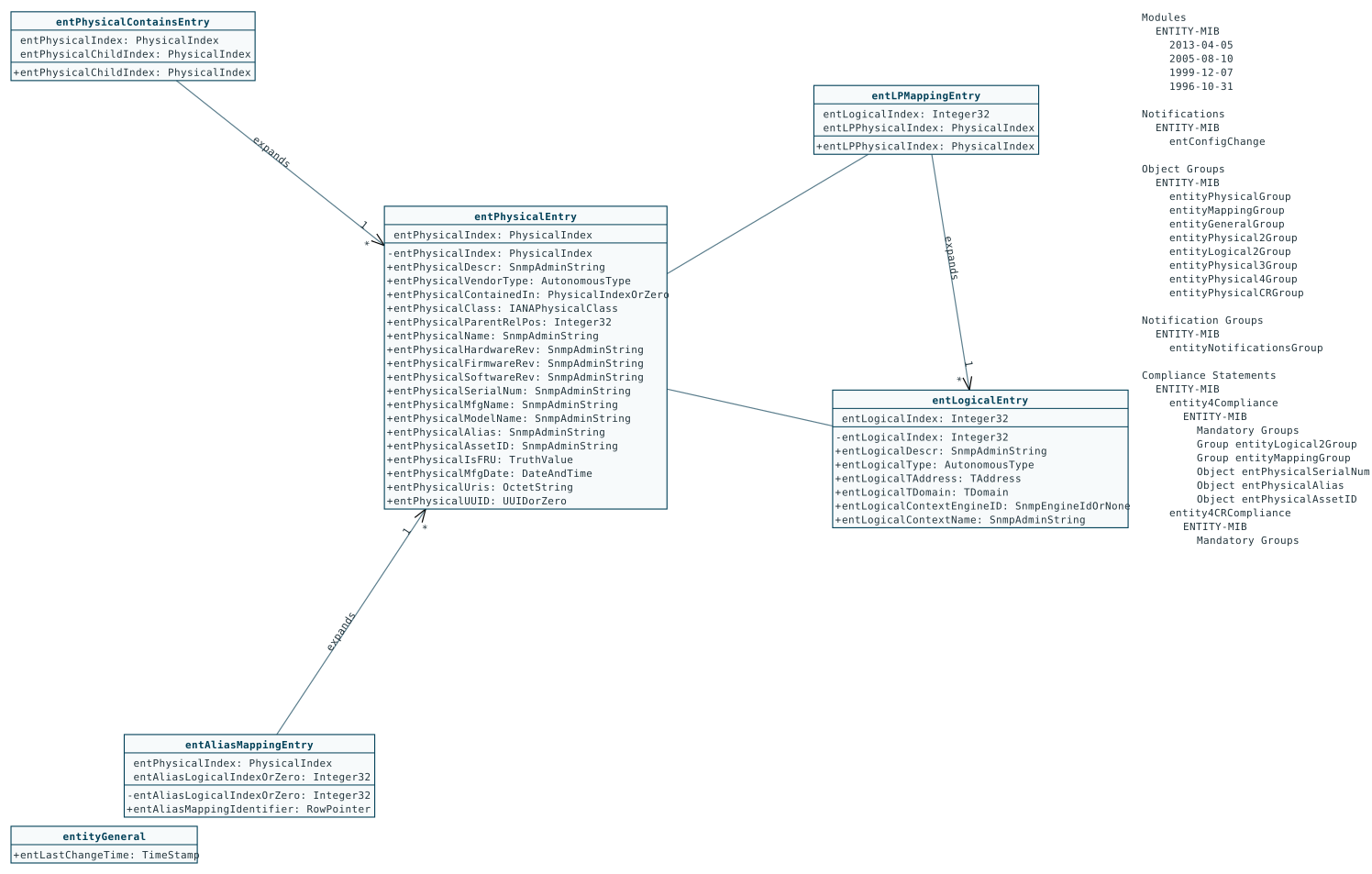
UML class diagram of the ENTITY-MIB: classes entPhysicalEntry, entLogicalEntry, entLPMappingEntry, entAliasMappingEntry, entPhysicalContainsEntry and entityGeneral with their index and columnar objects, connected by expands relationships; on the right the module's revisions, notifications, groups and compliance statements
smidump -f svg ENTITY-MIB (static output)

Background

In Reverse Engineering Internet MIBs, Jürgen Schönwälder and Andreas Müller developed an algorithm that extracts conceptual models from MIB modules. The algorithm is implemented in smidump as the output format cm, which produces XML files for the dia diagram editor. Klaus Sperner extended smidump by the format svg, which draws the same model as an SVG (Scalable Vector Graphics) diagram. Today, all web browsers display SVG directly.

The SVG diagrams, their layout and their interactivity (dragging classes, tooltips, highlighting of groups and compliances, folding of the module information) are the work of Klaus Sperner (2004–2005), based on the reverse engineering algorithm and the cm driver of Andreas Müller and Jürgen Schönwälder. In libsmi 0.6 (2026) the driver was fixed for descriptions with many special characters, and its links to a former CGI script were replaced by the option --svg-link-url; the web tools show his diagrams with a matching font, zooming and panning.

Reading a diagram

There is a UML class for each conceptual row definition of the modules:

  • The name of the class is the name of the row definition. With the interactive output, the small square on the left of the name is a handle to drag the class with the mouse, and the descriptions of the table and its entries appear when the mouse is over the name.
  • An optional second section shows the scalar objects associated with the class.
  • The next section lists the objects of the INDEX clause of the row.
  • The last section contains all columnar objects of the row; index objects defined in the same table appear in both sections.
  • Each entry shows the name of an object and its type, preceded by - if the object is not-accessible, else by +. Descriptions appear as tooltips. Objects in blue are defined in another module: in the web tools, clicking them draws the diagram again with that module added.

Scalar objects that are not bound to a conceptual row are grouped into additional classes. Besides unlabeled edges there are four kinds of labeled edges: augments, sparsely augments, reorders and expands, with cardinalities and arrowheads; their meaning is explained in the paper. Dashed edges are dependency relationships.

On the right, the diagram lists further information on the modules:

  • Modules – the modules with their revision history; descriptions appear as tooltips.
  • Notifications – the notification types; the objects of a notification are highlighted in the class diagram when the mouse is over it, a click keeps them highlighted.
  • Object Groups and Notification Groups – likewise for the groups.
  • Compliance Statements – for every statement the modules with their mandatory groups, groups and objects, with the same highlighting.

Command line

smidump writes the diagram to standard output. Use -u to draw several modules in one diagram:

$ smidump -f svg ENTITY-MIB > ENTITY-MIB.svg
$ smidump -u -f svg IF-MIB IP-MIB > interfaces.svg
$ smidump -f svg --svg-static-output --svg-show-deprecated IF-MIB > IF-MIB.svg
OptionMeaning
--svg-width=number, --svg-height=numbersize of the SVG canvas (default 1100 × 700)
--svg-show-deprecatedshow deprecated objects
--svg-show-depr-obsoleteshow deprecated and obsolete objects
--svg-static-outputno interactivity (no scripts), e.g. for printing or for documents
--svg-link-url=urllink objects and modules of other modules to url?…&mibs=A&mibs=B, a diagram that includes them (the web tools use diagram.php); without it there are no links

The web tools show the diagrams with a font that matches the box sizes computed by smidump, fit the view to the whole diagram, and add zooming and panning; the styled diagram can be downloaded as static SVG or as PNG.


last changed 2026-11-17, 15:48 by Frank Steinberg

For All Visitors

Vacancies of TU Braunschweig
Career Service' Job Exchange 
Merchandising

For Students

Term Dates
Courses
Degree Programmes
Information for Freshman
TUCard

Internal Tools

Glossary (GER-EN)
Change your Personal Data

Contact

Technische Universität Braunschweig
Universitätsplatz 2
38106 Braunschweig

P. O. Box: 38092 Braunschweig
GERMANY

Phone: +49 (0) 531 391-0

Getting here

© Technische Universität Braunschweig
Imprint Privacy Accessibility